Pre-season medical intake is only complete when every required form, document, and signature is in place.
Before athletes begin a new season or program, medical staff need confidence that the health-history, intake, consent, and waiver documentation is all accounted for.
This is not about managing one form at a time. It is about coordinating the full process across groups of athletes: preparing the right forms, making them accessible, tracking completion, and following up before gaps become a problem.
Forms gives medical teams a structured way to manage that workflow within iP: Intelligence Platform.
The Scenario
A participation deadline is approaching. The organization may be preparing for:
- The start of a season or training block
- A training camp or competition cycle
- The onboarding of new or returning athletes
- An academy, collegiate program, national team, sports institute, or professional organization
In each case, the medical team needs answers to the same questions:
- Has every athlete completed the assigned forms?
- Are the required health-history and intake fields complete?
- Have supporting documents been uploaded and signatures captured?
- Who still needs a reminder or follow-up?
- Can staff review responses under the appropriate permissions?
The difference is whether the team spots gaps in advance or discovers them after athletes have arrived and participation is underway.
What Typically Happens: The Pre-Season Intake Problem
When intake and consent rely on paper, PDFs, email, or separate survey tools, the process works against the team.
How Forms Helps: One Structured Pre-Season Workflow
Prepare the documentation
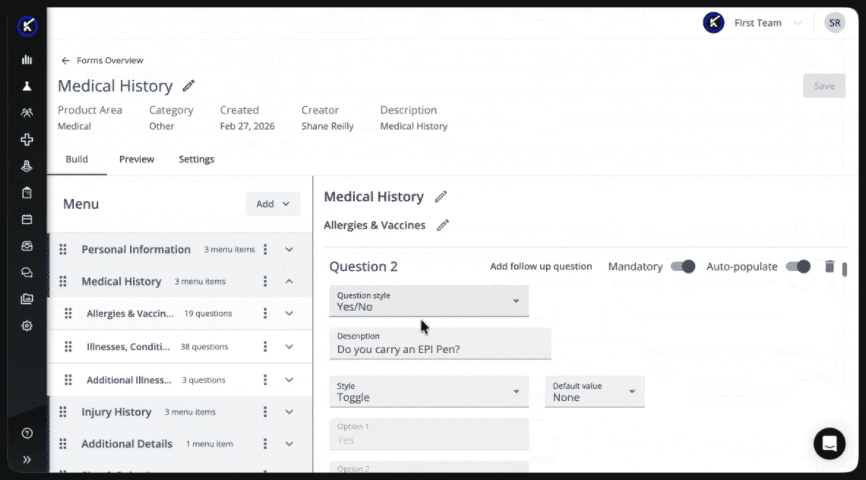
Create configurable forms without code for health history, intake, consent, and waivers. Use conditional questions, required fields, instructional content, file uploads, and digital signatures to support each requirement.
Combine forms into one packet
Group multiple templates into a single packet so athletes can complete everything through one coordinated process.
Medical teams can reuse that structure across athlete groups instead of assembling separate files and links for each person.
Schedule and assign the intake window
Set the completion period and assign the packet to the relevant athletes.
Each athlete receives an email with a direct link, reducing the need to search across attachments or systems.
Support completion through a web browser
Athletes can complete assigned Forms through a mobile-responsive browser on a phone, tablet, or computer.
Auto-save and draft mode allow athletes to leave a longer form and return without losing progress. For returning athletes, selected responses from a previous submission can also be auto-populated when completing the same form again, reducing repetitive data entry.
Track completion and follow up
See who has submitted the required forms and who remains outstanding across the athlete group.
Reminder emails can be sent to incomplete athletes, directing follow-up where it is needed rather than sending it to everyone.
Review and report within iP
Review and manage responses under the appropriate iP permissions, with an audit trail helping staff maintain a consistent record.
Data collected through Forms can also be reported on and visualized in My iP alongside other athlete information.
The Pre-Season Intake Outcome
With Forms, medical teams can reach day one knowing where things stand rather than scrambling to find out.
Teams can:
- See who is complete and who remains outstanding in one view
- Replace paper, PDFs, and separate survey tools with one trackable process
- Give athletes a reliable way to complete longer forms without losing progress
- Maintain auditable consent and health-history records under the appropriate permissions
- Report on and visualize collected data in My iP alongside other athlete information
Because Forms is part of iP Core, teams can manage these workflows within the same platform they already use to manage athlete data rather than buying and maintaining another disconnected system.