A wellness check is most useful when athletes can complete it consistently and staff can review the responses before the day’s activity begins.
Ahead of training, competition, recovery, or another scheduled activity, performance and medical teams may need a clearer view of how athletes are feeling, how they have responded to recent demands, and whether anyone may need a closer look.
This is not about collecting one questionnaire in isolation. It is about creating a repeatable process across groups of athletes: asking consistent questions, making questionnaires easy to complete, reviewing responses, and reporting on trends over time.
Athlete Screening gives organizations a repeatable way to manage that recurring workflow within iP: Intelligence Platform.
The Scenario
Athlete Screening can support recurring collection at key points throughout the training and competition cycle, including:
- Before training
- Around competition
- During recovery
- After travel or training camps
- Across training blocks
- Ahead of individual or group reviews
Before activity begins, staff are usually asking:
- How ready does the athlete feel, and how well did they sleep or recover?
- Are they experiencing soreness, pain, or other symptoms?
- How has the athlete responded to the previous session or recent training demands?
- Is there a specific body area that needs attention?
- Are responses changing across several days or sessions?
- Does anyone need follow-up before taking part?
The difference is whether staff collect and review that information early enough to support the day ahead or discover concerns once activity is already underway.
What Typically Happens: The Recurring Screening Problem
When recurring athlete check-ins rely on paper, spreadsheets, messages, or general-purpose survey tools, the process becomes difficult to sustain.
The result is more administration and a less consistent view of how athletes are responding over time.
How Athlete Screening Supports the Workflow
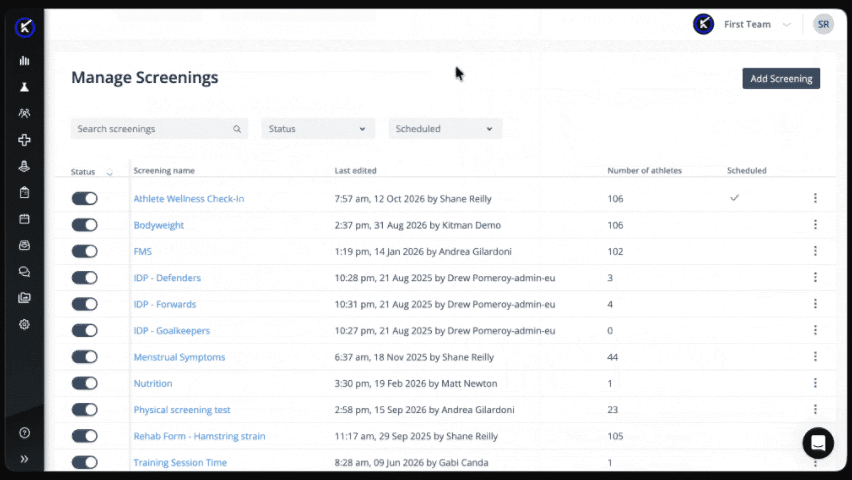
Prepare the screening
Create configurable screenings for recurring athlete inputs such as wellness, readiness, RPE, soreness, symptoms, nutrition, and recovery using screening-specific response formats:
- Scales and descriptors
- Body maps
- Single- and multiple-choice questions
- Numeric responses
- Written responses
- Required questions
This gives staff a consistent structure for the information they collect regularly.
Schedule and assign the screening
Set the screening to follow the rhythm of the workflow, whether that is daily, after a session, at specific points in a training block, or around competition.
Assign it to the relevant athlete group so each athlete receives the right questions at the right time.
Make recurring completion easier
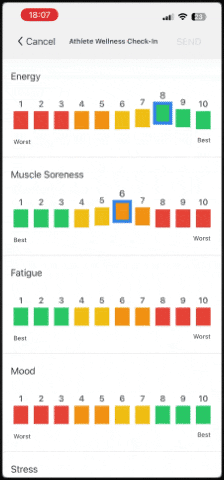
Athletes complete assigned screenings through the Athlete App or kiosk.
The experience supports regular athlete-facing collection, helping organizations make wellness checks, RPE submissions, body-map inputs, and other recurring questionnaires part of the normal routine.
Review responses before activity
Staff manage and review Athlete Screening workflows within iP, so performance and medical teams can see across the athlete group which responses stand out and where a closer conversation or assessment may be needed.
Report on responses over time
Data collected through Athlete Screening can be reported on and visualized in My iP alongside other athlete information.
This helps teams move beyond one-day responses and review patterns across athletes, groups, sessions, and longer periods.
The Athlete Screening Outcome
With Athlete Screening, performance and medical teams can approach activity with a clearer view of how athletes are responding.
Teams can:
- Collect recurring athlete inputs through one consistent process
- Give athletes a familiar way to complete recurring checks through the Athlete App or kiosk
- Identify which responses align with recent patterns and which may need closer follow-up
- Replace paper, spreadsheets, messages, and separate survey tools with a repeatable workflow
- Review individual and group patterns over time in My iP
Instead of rebuilding the same check-in across different tools, teams keep one process inside iP Core and carry the results into reporting in My iP.