Workload is never the only story behind injury—but it is always part of it.
Medical and performance staff routinely track session RPE, GPS metrics, and exposure, while also maintaining a long-term record of each athlete’s injury history. On their own, these data points can be noisy. Together, they can help explain why some athletes struggle to tolerate certain weeks, phases, or progressions.
With the Performance Medicine Solution in iP: Intelligence Platform, medical staff can bring workload trends—sourced from the Performance Optimization Solution—together with injury history in a single visual view to support more informed, collaborative decision-making.
The Challenge
Metrics like acute and chronic workload can help describe changes in training demand and highlight potentially risky spikes—but they are not stand-alone injury prediction tools. Medical teams know this; they want context, not a magic number.
In reality, workload data often lives in one set of reports, injury history in another, and long-term trends in yet another. That fragmentation makes it hard to answer clinically relevant questions like:
- Is this spike in load happening on top of a long injury history?
- How does this year’s workload and injury burden compare with last season—or the previous five?
- Are we consistently operating outside our “comfort zone” of change, or is this an isolated phase?
Without the ability to see workload changes and injury patterns in the same visual, it’s difficult to translate data into grounded, shared decisions.
What We Hear from Medical Staff
From doctors, physios, and leaders in medical and performance teams across clubs and organizations:
- “We don’t want a magic number—we want a clearer picture of how workload and history interact.”
- “I can see acute spikes or high chronic loads, but it’s not easy to align that with previous injuries and our current injury burden.”
- “If we could see workload trends, thresholds, and injury history together, we’d have better conversations with coaches about risk—not just more reports.”
The Solution: Overlaying Workload and Injury Context
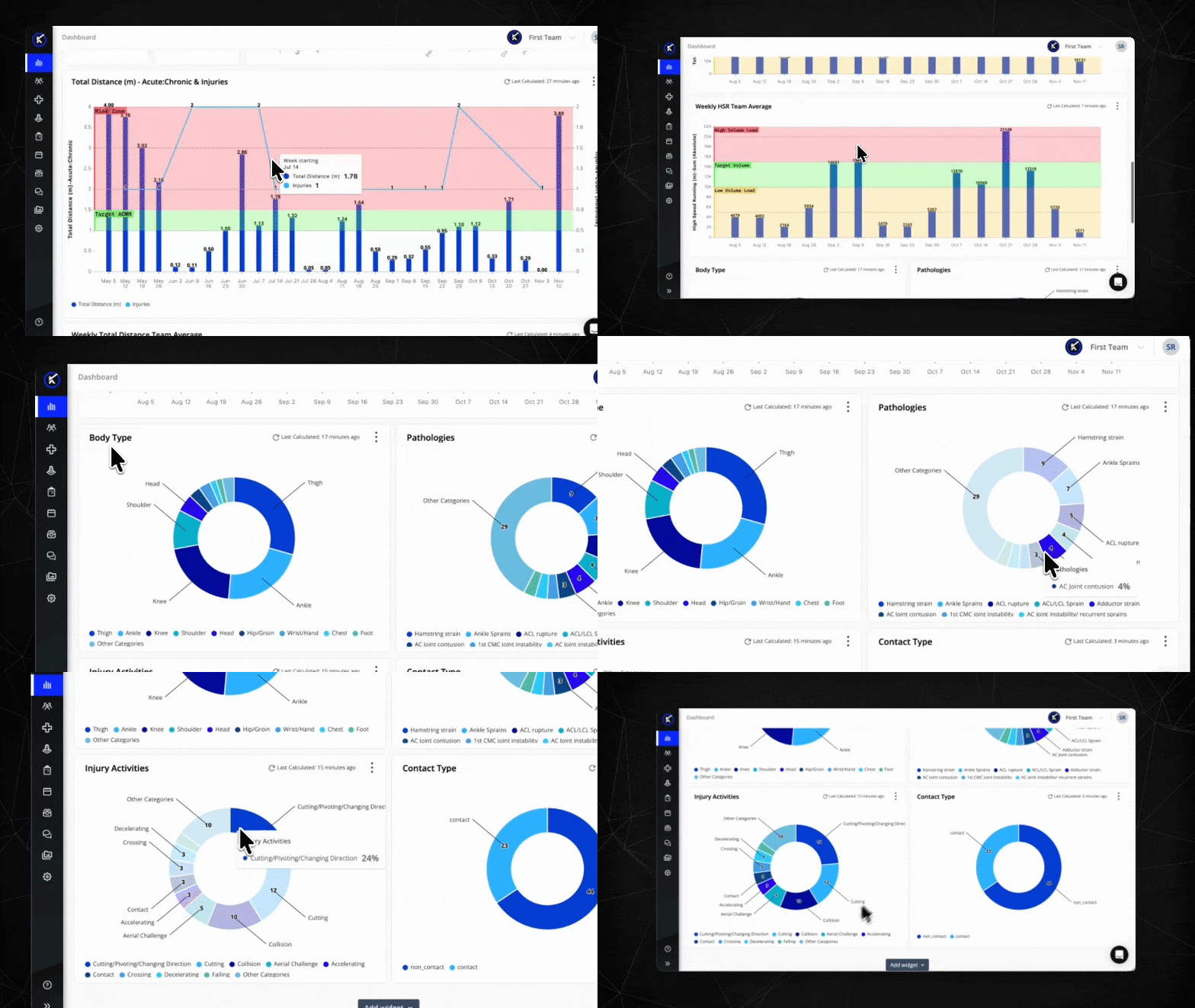
With the Performance Medicine Solution in iP, medical staff can combine workload trends—captured by the Performance Optimization Solution—with injury history in a single connected view.
Using iP’s analysis and visualization capabilities, they can:
- Plot short-term (acute) and longer-term (chronic) workloads based on session RPE or external load.
- Add a simple ratio or change indicators to highlight periods of rapid increase or reduced exposure.
- Compare current-season workload and injury counts against previous seasons or multi-year averages.
- Relate individual athletes’ current load context to their past injury history in one view.
The goal isn’t to “predict” injuries from a single metric. It’s to give medical staff a better-informed picture when advising on progression, return to performance, or team management.
What You Can Do in Performance Medicine
Track Simple Acute and Chronic Load Using Session RPE
- In the Analysis section, create a dashboard and add an XY Chart.
- Use the Add Data option to select session RPE load (for example, RPE × duration) as your workload metric.
- Configure two time windows to represent:
- A short-term “acute” window (e.g., 7 days).
- A longer-term “chronic” window (e.g., 21–28 days), based on your environment.
- Plot both series over time to see how short-term strain sits on top of longer-term exposure.
Add a Simple Change or Ratio Indicator
- Create a calculated field to represent the relationship between acute and chronic load (or week-on-week percentage change).
- Display this as a line on the same chart, or as a separate widget, to flag periods of rapid change.
- Use this line as a discussion guide, not a diagnostic tool—highlighting phases where load is changing faster than usual.
Compare Workload Patterns to Injury Counts Across Seasons
- Add Number or Bar widgets to track:
- Total time-loss injuries this season.
- Time-loss injuries by body region, tissue type, or mechanism.
- Add an XY Chart to compare this season’s workload curve and injury counts against:
- Last season, or
- A rolling 3–5 year average, where data is available.
- Use iP’s ability to show multiple lines on one chart so current trends can be directly compared with historical baselines.
Relate Individual History to Current Load Context
- Filter the dashboard to a single athlete with a meaningful injury history.
- Display their acute and chronic workload series alongside:
- A simple change or ratio indicator.
- Markers or annotations for recent and historical injuries.
- Use this view to support 1:1 discussions around progression, return to performance, or constraint-based loading.
Support Clinical and Coaching Conversations
- Share the dashboard with the medical, performance, and coaching staff.
- Use it in weekly or phase reviews to discuss:
- Which athletes are experiencing rapid load change and have complex injury histories?
- Whether the current season’s workload and injury burden are drifting away from long-term norms.
- Align on practical actions: adjusting volume, modifying formats, or layering additional monitoring for those in higher-concern zones.