Across a season, athletes have opportunities to play and train. When an athlete cannot take part because of injury, illness, or another absence, there is usually a record explaining why.
When an athlete is available and still does not play, there may be no record explaining what happened. That group can be harder to see because nothing draws attention to them.
iP: Intelligence Platform connects both sides. Availability comes from the Performance Medicine Solution, while match and training exposure come from the Performance Optimization Solution. Building this view requires both Solutions.
In Reporting & Visualizations in My iP, a Creator can bring those records together for the same athletes across the same period.
The Challenge
Availability is usually reported. What athletes did with the time they were available can be harder to see because the answer sits across different records.
- Unavailability reported in days, while coaching staff think in matches and minutes
- Match participation and training records held in separate reports
- Attendance marked complete when an athlete only completed part of a session
- Selection recorded without showing whether the athlete actually played
- No simple way to compare what an athlete could have played with what they actually did
When an athlete is injured or unavailable, there is usually something that draws attention to them. When an athlete is available but receives little or no match or training time, there may be nothing that prompts staff to look.
Each record can be accurate on its own. None of them tells the full story alone.
What Performance Teams Are Trying to Answer
- How many matches did an athlete actually miss while unavailable?
- Which athletes were available but still received little or no match time?
- Did an athlete attend the full training session or only part of it?
- Was an athlete selected but left on the bench?
- How much time would it take to bring availability, selection, and participation together manually?
The result is often a record that explains absence well, but makes opportunity much harder to understand.
What You Can Build in My iP
A Creator can build this view for their organization and share it with other staff. Creators build and share views in My iP, while other staff can open and use the same view.
Account for Available Minutes
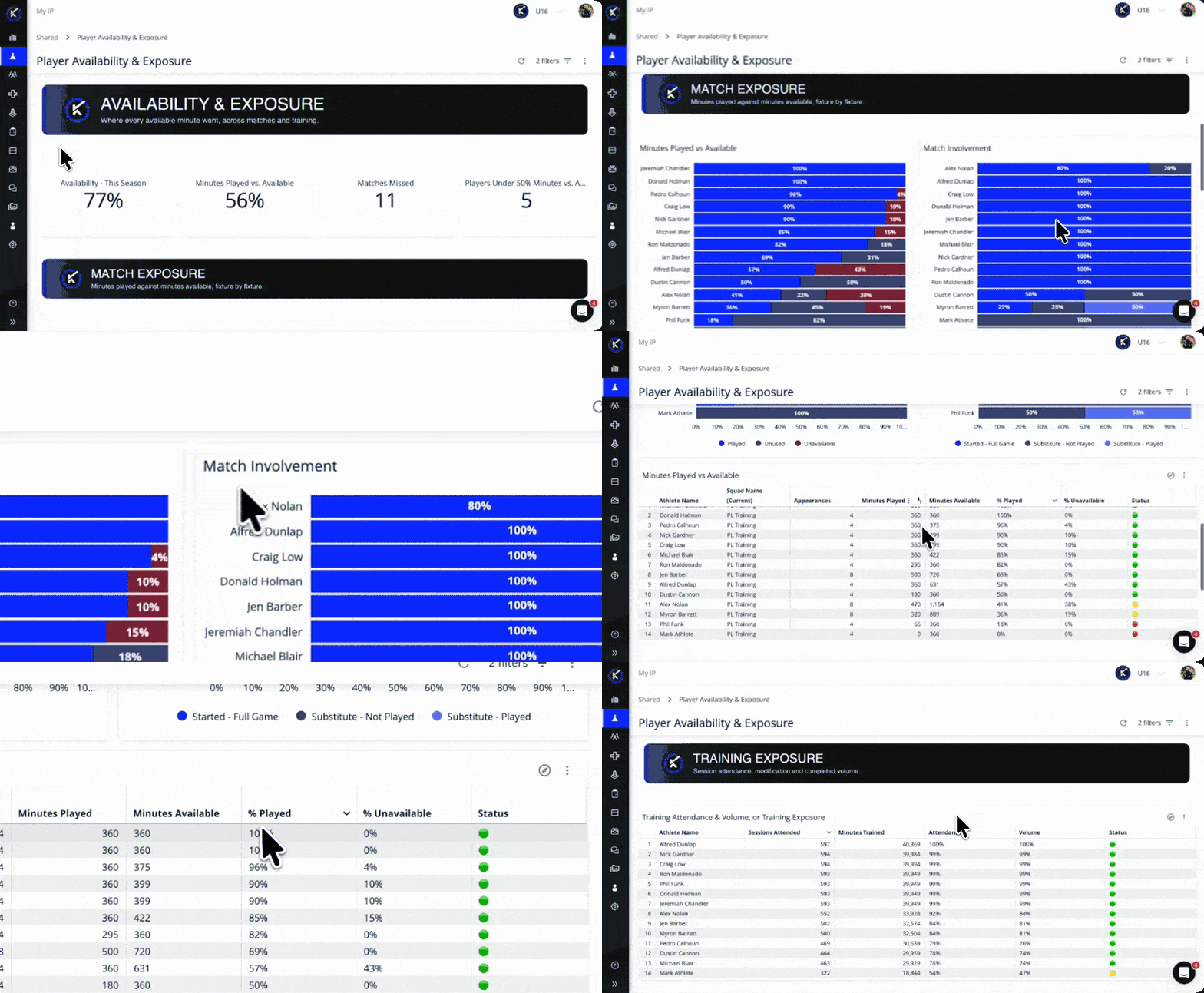
Compare the total minutes an athlete could have played with minutes lost to unavailability, minutes available but unused, and minutes actually played.
Together, those measures show what happened to the available playing time across the period.
Compare Match Minutes With Availability
Review appearances, minutes played, available minutes, and the share of available minutes used for each athlete.
This makes it easier to identify athletes who were available but still received little or no match time, without manually comparing separate reports.
Separate Selection From Participation
Break match involvement into starts, appearances from the bench, and matches where the athlete was selected but did not play.
This makes selection and actual playing time two separate measures.
Compare Training Attendance With Completed Minutes
Review sessions attended alongside the share of planned training time completed.
An athlete who attended but completed a modified session can be separated from an athlete who completed the full session.
Show Time Lost as Match Opportunities
Translate a period of unavailability into the matches it affected, rather than showing only the number of days missed.
For conversations with coaching staff, leadership, or ownership, matches affected can provide clearer context than days alone.
What the View Does Not Decide
The view shows where the minutes went.
It does not explain why an athlete was not selected or decide what should change next. Those decisions stay with the staff responsible for them.
The view also depends on complete and accurate records from each source. The Data Health Check Dashboards in My iP give staff an ongoing way to see what needs attention across availability, match, and training records.
Support Better Availability and Exposure Conversations Across Staff
The same view helps different roles answer different questions.
- A Head of Performance can review match and training time against availability without rebuilding the comparison each week.
- For a medical or physiotherapy lead, the same view shows what a period of unavailability cost in match opportunities.
- Coaches and analysts can review how minutes and match involvement have been distributed across the team.
- An academy or pathway lead can check whether developing athletes are getting the match and training exposure planned for them.
Everyone works from the same connected record, each using it for the decisions they are responsible for.
The Outcome: Know Where the Minutes Went
- Account for the playing and training opportunity available to an athlete across a period
- Identify athletes whose availability and match time do not line up
- Separate being selected from actually playing
- See when training attendance included only part of a session
- Express unavailability in matches affected as well as days missed
- Reduce the manual work needed to combine availability, match and training reports
The records already exist in iP: Intelligence Platform. Bringing them together for the same athletes across the same period makes it possible to see where the available minutes went.