Game data issues rarely stay in the match calendar.
Game records do more than populate the match calendar. They support exposure calculations, competition-based reporting, post-match review, game-week analysis, and downstream dashboards across iP: Intelligence Platform.
When those records are incomplete or inconsistent, small issues can create bigger reporting problems:
- A game mapped to “Other” can weaken competition-based reporting
- A missing result can affect post-match review
- An incorrect game-minute total can distort exposure-based calculations
- An unusual game-week length can skew congestion analysis
- A duplicate fixture can change the story before anyone realizes the data is wrong
The Game Data Health Checks Dashboard in My iP gives teams a repeatable way to surface those issues before they affect reporting.
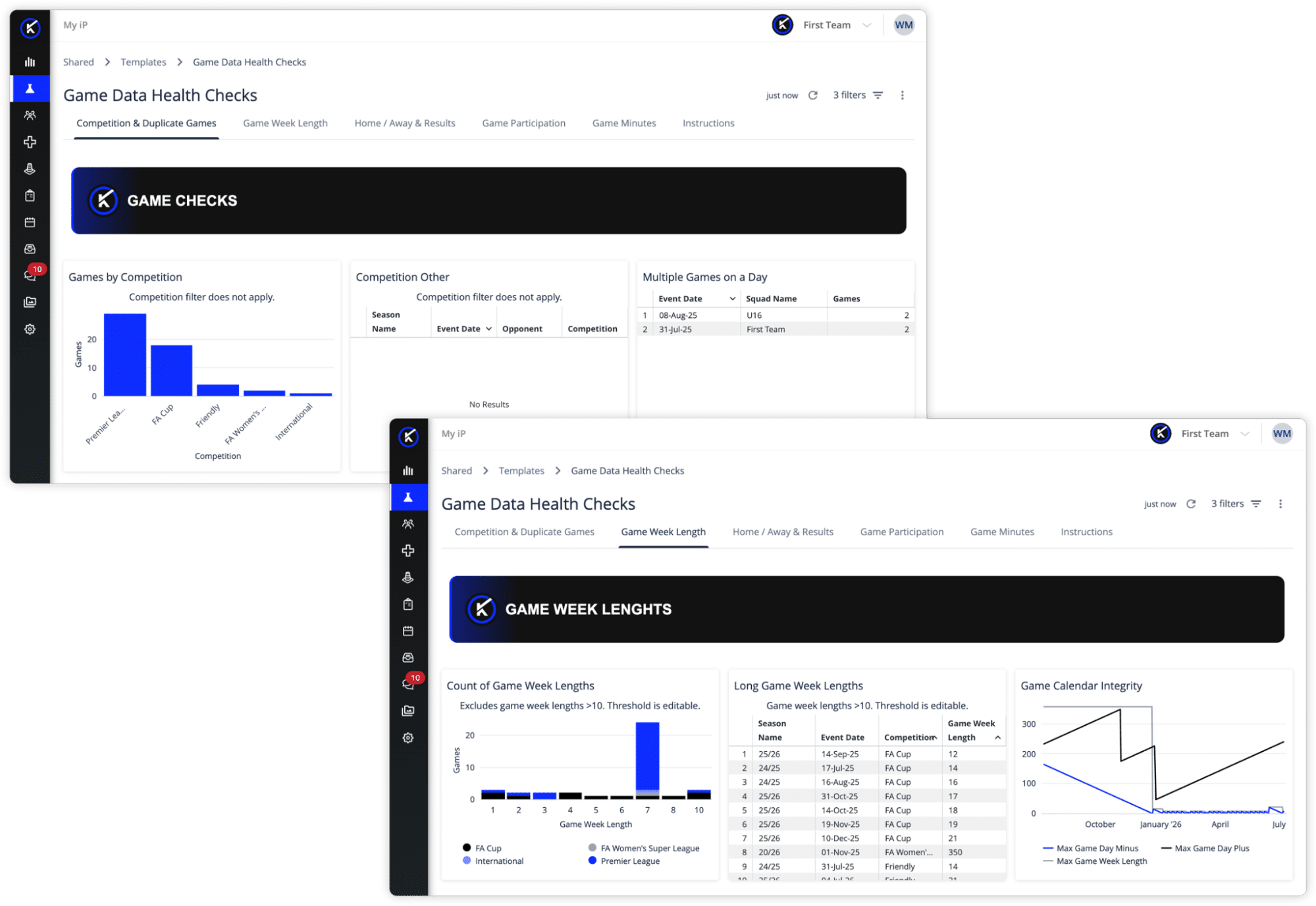
Available as part of the Data Health experience, it gives teams a clear view of game data integrity, the foundation behind reliable exposure, competition, and season-level reporting.
Why Game Data Health Matters
Game data connects to more than the match calendar.
It supports questions like:
- Are games mapped to the right competition?
- Are results complete and ready for reporting?
- Are home, away, and neutral values captured correctly?
- Are participant counts and game minutes plausible?
- Are game-week lengths accurate enough for congestion analysis?
- Can exposure-based metrics be trusted?
When game data is incomplete or inconsistent, issues may not surface until later, when an exposure rate looks wrong, a competition segment does not match expectations, or a stakeholder questions a reporting output.
That creates rework when teams are already trying to finalize reports, review performance, analyze injury trends, or prepare stakeholder updates.
Instead of discovering game data issues downstream, teams need a repeatable way to check game records earlier.
A Clearer Way to Check Game Data Quality
The Game Data Health Checks Dashboard brings key game record checks into one view, helping teams quickly understand where game data may need review.
It is designed to help teams move from manual checks and reactive troubleshooting to a more consistent data-quality workflow.

The dashboard brings seven game record checks into one view:
- Competition mapping
- Multiple games recorded on the same day
- Game-week length and calendar integrity
- Home, away, and neutral values
- Game results
- Game participation counts
- Total game minutes
The goal is not just to find missing fields. It is to give teams a clearer starting point for reviewing game data before it affects dashboards, calculations, and reporting conversations.
What the Dashboard Helps Teams Review
The dashboard gives teams a default view of common game data-quality checks. Designated users can personalize the template over time to reflect the organization’s sport, competition structure, reporting needs, and review thresholds.
GAME CHECKS
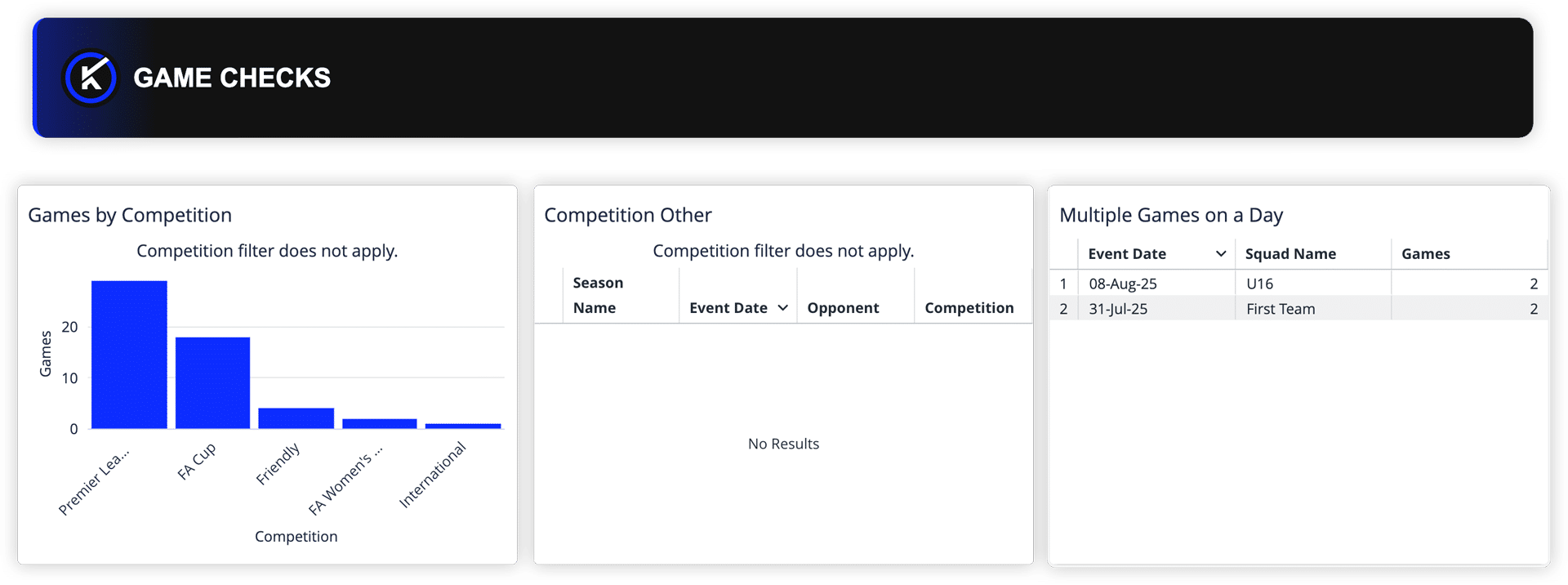
The dashboard helps teams review whether games are mapped to recognized competitions and whether any records are assigned to a generic or catch-all value such as “Other.”
It also surfaces dates with multiple games recorded, helping teams identify where duplicate fixtures may exist or where legitimate same-day games need confirmation.
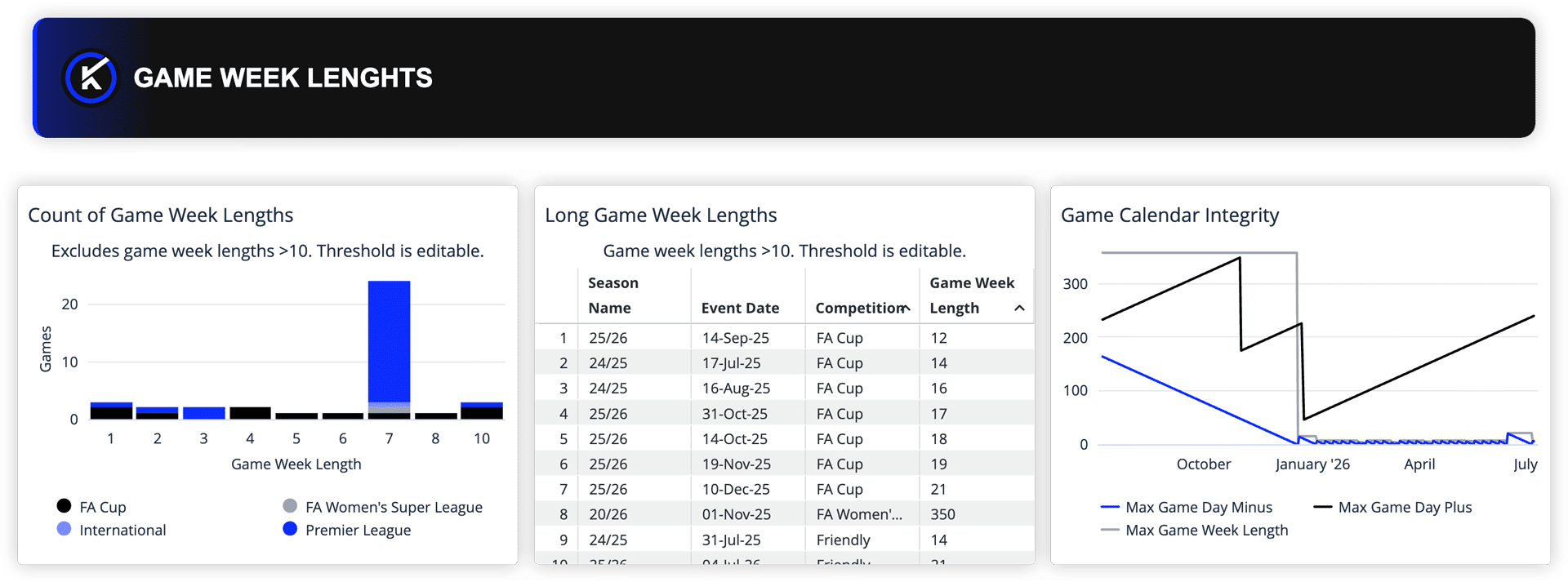
GAME WEEK LENGTHS
Game-week length affects how teams understand congestion, fixture rhythm, and the spacing between games.
The dashboard helps teams review game-week length distribution and identify unusual gaps that may indicate a real break, a returning competition, or a fixture-mapping issue. It also surfaces game day plus, game day minus, and game-week length over time, helping teams spot calendar anomalies before they affect season-level reporting or fixture analysis.
NEUTRALITY
Home, away, and neutral values provide important game context.
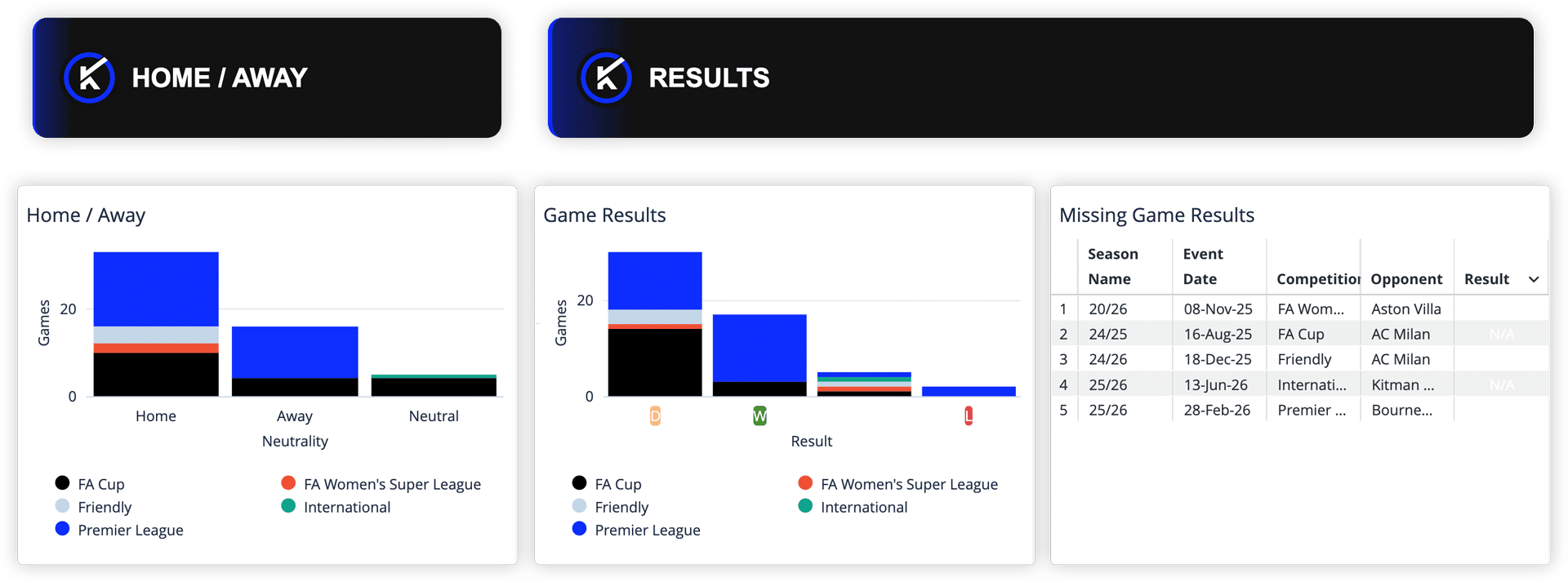
The dashboard helps teams review game neutrality distribution and identify games with missing neutrality values, supporting cleaner home/away analysis, travel-related review, and competition-based reporting.
GAME RESULTS
Game results provide important context for post-match review and downstream analysis.
The dashboard helps teams review result distribution and identify missing or unset result values so records can be updated before reports are shared.
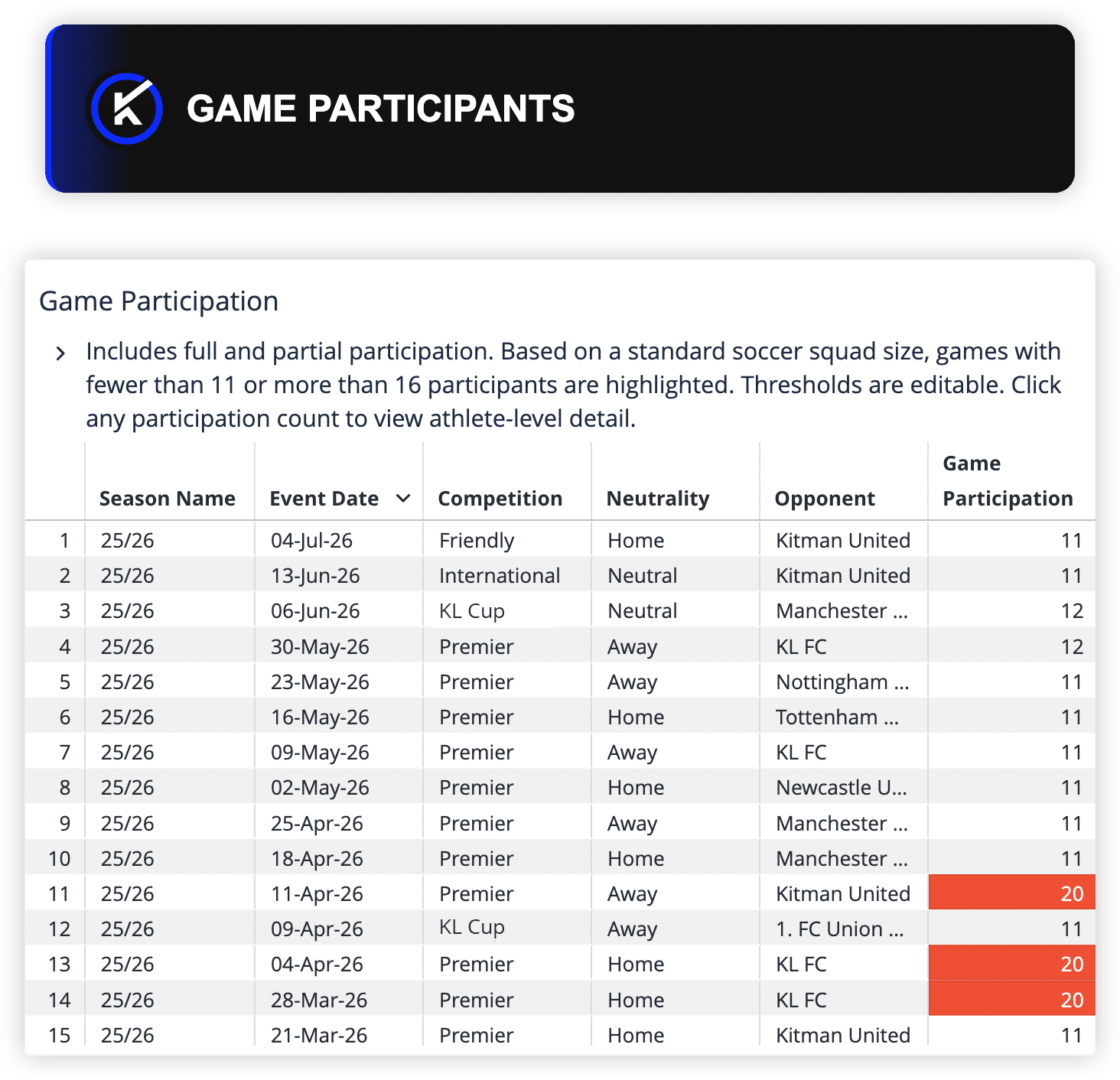
GAME PARTICIPANTS
Participant counts help teams understand whether the expected number of athletes were recorded for each game.
The dashboard surfaces games with participant counts outside the default review range, helping teams identify probable data-entry gaps or records that need further investigation. Designated users can adjust the participant-count range to reflect what is expected for their sport or competition format.
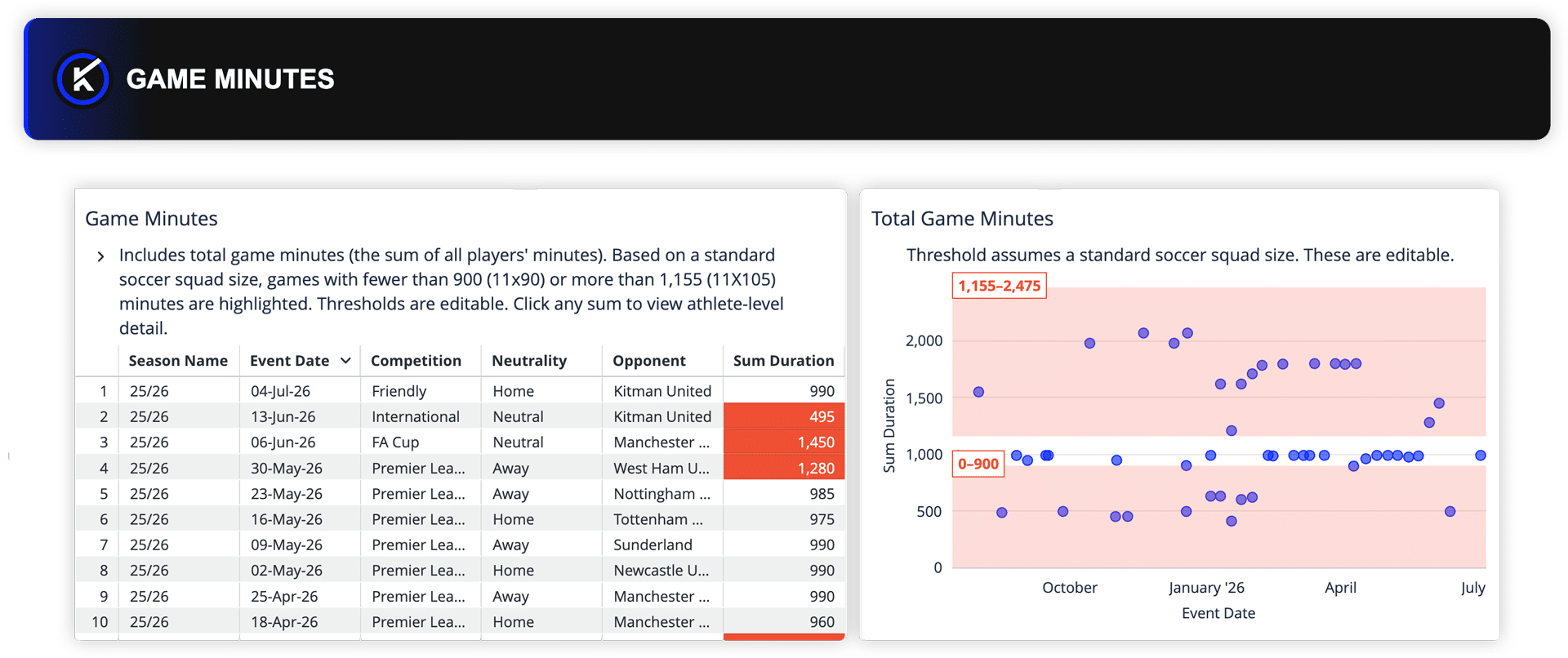
Game Minutes
Total game minutes support exposure, workload, and participation-based reporting.
The dashboard helps teams review fixtures where total minutes fall outside the default review range and identify possible under-reporting, over-reporting, or missing participation data before those issues affect downstream metrics. Designated users can adjust the minutes range to reflect the sport, competition format, and reporting needs.
When Teams Should Use Game Data Health Checks
This is not a dashboard teams need to live in every day.
It is a dashboard teams should return to at key moments when clean game data matters most.
That might include:
- After each match round, before reports are circulated
- Before a season review or debrief
- Before a governing body submission
- Before competition-segmented analysis
- Before Injury Review or exposure-based reporting
- Before dashboard rollout or stakeholder reporting
- When exposure, game-week, competition, result, or minutes-based outputs look incomplete or unexpected
Used regularly, the dashboard helps teams catch game data issues earlier, reduce manual checking, and protect confidence in the reporting that depends on game records.
Who Benefits from Game Data Health Checks?
Data Managers and Admins
For club-side admins and data stewards, the dashboard provides a clearer way to manage game record hygiene.
Instead of manually checking game records across multiple fields, teams can review common game data-quality issues in one place and prioritize what needs attention.
Analysts and Reporting Owners
For analysts and reporting owners, game data quality affects whether outputs can be trusted.
Knowing which records may need review helps reduce rework, especially when building reports by competition, season, game-week length, result, or exposure. It also supports cleaner interpretation of load, congestion, and game-context analysis.
Heads of Medical and Performance
Medical and performance leaders may not own the clean-up process, but they depend on the output.
Clean game data helps ensure injury rates, exposure-based metrics, availability reporting, workload interpretation, and game-context analysis are built on complete and correctly mapped game records.
Supporting Better Data Review, Not Automatic Decisions
The Game Data Health Checks Dashboard helps surface records that may need attention, but it does not decide what should happen next.
A same-day game may be a duplicate record, or it may be a legitimate tournament, doubleheader, or reserve fixture. A long game-week length may indicate a data issue, or it may reflect a real break in the schedule. A participant count outside the expected range may require correction, or it may reflect a sport-specific threshold that needs to be personalized.
The dashboard gives teams a shared starting point for review, making clean-up conversations easier to prioritize and act on.
Cleaner Game Data, Stronger Reporting
Game Data Health Checks in My iP helps teams protect the game data behind dashboards, reports, and decisions.
By surfacing incomplete, inconsistent, or unusual game records in one repeatable view, teams can spend less time hunting for problems and more time improving the quality of the data their organization depends on.
Cleaner game data makes exposure, competition, and season-level reporting easier to trust.
And when reporting is easier to trust, teams can move faster from data to insight to action.
Contact us to explore how the Data Health experience can help your organization strengthen the data behind its reporting.